


FaxFree: Send Faxes from Phone
4.4955.00 Reviews
App Specs
- Version
- 2.11.0
- Updated On
- License
- Free
- Downloads
- 500,000+
- Developer
- BP Mobile LLC
- Categories
- Business
- Platform
- Android
Screenshots
 Analysis by AppCompare
My experience with FaxFree has convinced me that mobile faxing is most useful when it solves a specific, time-sensitive problem—not when it tries to replace every part of an office workflow. The app, made by BP Mobile LLC, is a business tool for sending and receiving faxes from a phone. That can be a practical fallback when a form still has to reach a fax number and printing, finding a machine, and making a separate trip would slow everything down.
The catch is that faxing by phone depends on a working connection and a document that is ready to send. I’d prepare the file and check the recipient’s number before starting, especially if I were away from home or handling something urgent. FaxFree is free to download, but its in-app purchases range from $4.99 to $59.99 per item, so I’d check the cost in the app before treating it as a routine business expense.
When a phone connection becomes part of the workflow
A mobile fax app is not quite like taking a picture and keeping it on your phone: the document has to travel to a fax destination. That makes connectivity central to the experience. I would avoid leaving a send attempt until the last minute in a place where service is unreliable, and I’d keep the document accessible on the device before opening the task. Those small steps reduce the chance of being stuck trying to locate a file while also troubleshooting a connection.
For occasional paperwork, that trade-off can still be worthwhile. If I’m away from a printer and need to send a signed page, scanning it with the camera and sending it from one device is simpler than returning to an office. For a large batch of paperwork or a document that must be handled through a particular business system, a desktop fax service or office setup may offer a more suitable process.
Mobile convenience has limits
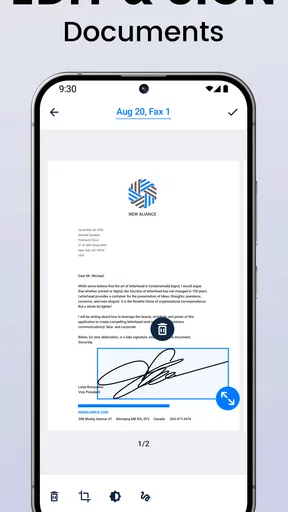
The camera scan is especially useful for a paper document that has no digital copy, but a quick photo is not automatically a good fax. I’d use a flat, well-lit surface, keep the page edges visible, and check the preview for shadows, blur, or cut-off text before sending. A recipient cannot read a detail that was poorly captured, and correcting a bad scan may mean repeating the work.
That is also why I would not rely on the phone workflow for every document. Multi-page paperwork can take more care to capture and review than selecting a clean file, while detailed forms are easier to inspect on a larger screen. FaxFree suits the “I need to send this page now” moment better than a long, carefully organized document process.
What to do when a send does not go as planned
A confirmation is helpful, but I still treat it as a checkpoint rather than a reason to stop paying attention. I would verify the number before sending, make sure the right document is attached, and look for the app’s result afterward. With faxing, a typo in the destination can matter as much as a weak connection, so checking the recipient details is a simple habit with real value.
Worth Reading Before You Choose

EA SPORTS FC Mobile 26 Is a Bigger Football Game, but It Takes Time

Flipboard Shows What News Apps Must Do Beyond the Feed

Switching to Android Auto Means Rethinking Your Driving Routine

Google Calendar Makes a Crowded Week Easier to Manage

Ludo King Makes the Most of the Minutes Between Plans

Baby Panda World Brings Quick Play to Modern Phones, but Its Game Library Feels Busy
If an attempt appears to stall, I would first check the network and the selected file rather than immediately tapping send repeatedly. Repeated attempts can create uncertainty about which copy went through and may also use additional credits. For important paperwork, keep the original document available until you have a clear result, and contact the recipient through another channel if timing matters and delivery is uncertain.
Keeping mobile use focused and cost-aware
Faxing a document from a phone can use mobile data, so I’d prefer a stable connection when sending a large scan or several pages. If I’m watching data use, preparing the document over Wi-Fi and avoiding unnecessary resends are sensible habits. The key point is not that faxing requires a special data plan; it is that a failed connection can interrupt the task, so the best place to send is often the place where the connection is dependable.
FaxFree has a 4.3 average from around 4.3 thousand ratings, and it has been installed over 100 thousand times. It is rated for Everyone, while the current version is 2.10.1 and the minimum operating-system requirement is version 10. Those details make it easier to judge whether it fits your phone and comfort level, but they do not remove the practical questions of cost, connection, and document quality.
Getting Started with FaxFree
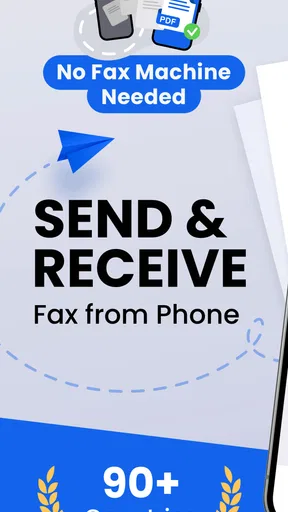
If you’ve ever found yourself in a bind needing to send a fax and realized you’re nowhere near a fax machine, then the app FaxFree: Send Faxes from Phone could be your new best friend. Let’s face it, fax machines seem like relics from the past, but they’re still surprisingly relevant in many fields today. I decided to give this app a whirl to see if it lives up to its promise of making faxing from your phone a breeze.
First things first, downloading FaxFree: Send Faxes from Phone is a straightforward process. Available for both Android and iOS, you just need to head over to the Google Play Store or the Apple App Store and hit download. It’s a light app, so it won’t hog too much of your phone’s memory, which is always a plus in my book.
Once installed, the setup is pretty intuitive. The app greets you with a clean interface that’s easy to navigate. I appreciated the simple design because, honestly, who has time to figure out complicated apps these days? You’ll need to create an account or link it to your existing email, which is pretty standard fare.
Navigating the Features
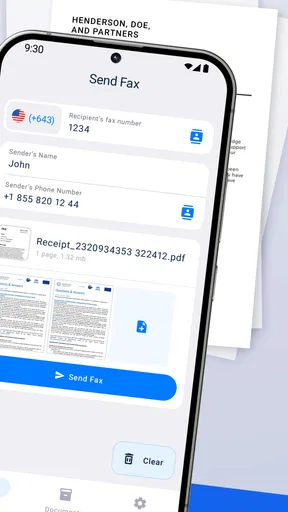
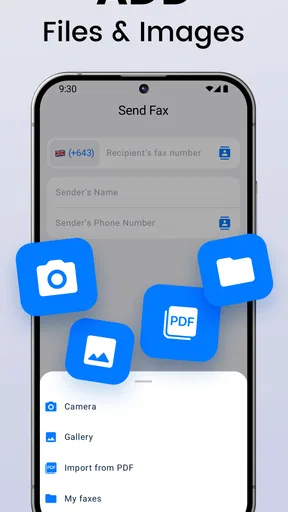
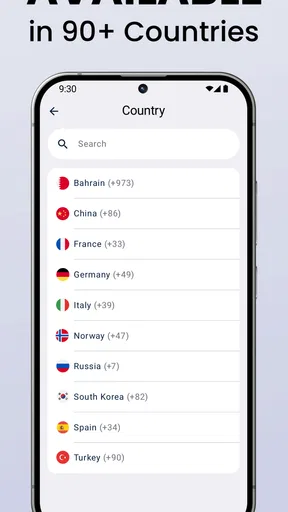
What I found really handy about FaxFree is the variety of features it offers. You can send a fax to any number worldwide, and the app supports multiple document formats. Whether it’s a PDF, Word document, or even a photo, FaxFree has got you covered. I tried sending a couple of different file types, and each one went through without a hitch.
There’s also a neat feature that lets you scan documents using your phone’s camera. This is super useful if you don’t have a digital copy of the document you need to fax. Just snap a picture, adjust the edges, and you’re good to go. It’s almost like having a mini office in your pocket!
The User Experience
Using FaxFree feels seamless, which is something I can’t say for many other apps. After selecting a document and entering the recipient’s fax number, you simply hit send. The app gives you a confirmation once the fax is sent, which is reassuring—especially if you’re sending something important.
Another thing I noticed is how quickly the faxes are sent. I timed it, and in most cases, the entire process took less than a couple of minutes. That’s pretty impressive, given the complexity of some fax services.
Cost Considerations
Now, let’s talk about the cost. While FaxFree is free to download, sending faxes isn’t completely free. The app uses a credit system where you purchase credits to send faxes. The pricing is reasonable, and considering the convenience factor, I didn’t mind shelling out a few bucks. Plus, they often have deals or packages that can save you money if you’re a frequent faxer.
If you’re just sending the occasional fax, you can get by with the credits you purchase. However, if you’re planning to use this as your primary fax tool for business, it might be worth looking into their subscription plans for better value.
Security and Privacy
In today’s world, data security is a big deal, and FaxFree doesn’t skimp on it. The app uses encryption to protect your documents, which is crucial when you’re sending sensitive information. I felt pretty confident that my data was secure, and that’s a big thumbs up from me.
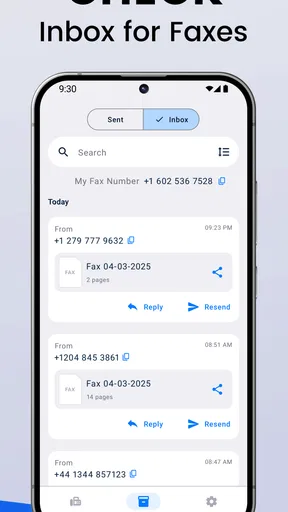
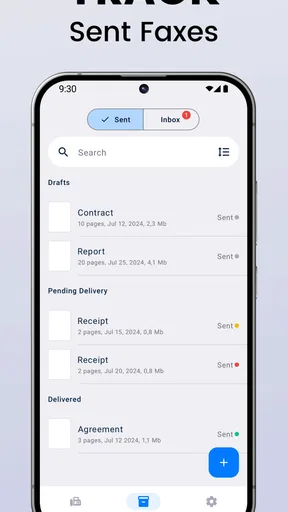
Also, the app maintains a log of all sent faxes, which is handy if you need to refer back to them. It’s like having a digital filing cabinet at your fingertips.
Choosing the right faxing method
I see FaxFree as a middle ground between hunting for a public fax machine and using a full office fax service. A public machine may be a poor fit if the document is private or the location is inconvenient, while an office system makes more sense when several people need a shared process. This app is most appealing when one person has a page to send and a phone is already in hand.
It is also different from simply emailing a PDF. Email is usually easier when the recipient accepts it, but some organizations still request a fax, and changing the format yourself may not satisfy their process. I’d use FaxFree when the destination specifically requires fax delivery, not as a default way to send every document. That distinction helps keep paid credits for the cases where faxing is actually necessary.
A useful workflow is to prepare the final document before opening the send screen: check that every page is upright, remove duplicate or draft pages, and confirm the recipient’s fax number from a reliable source. Then use the preview as a last quality check. This is more than tidiness; a clean, correctly ordered document is easier for the recipient to handle and less likely to require a second send.
Who will get the most from it
For a freelancer sending an occasional signed form, a small business owner away from the desk, or someone dealing with paperwork that must be faxed, a phone-based option can save a trip. One realistic example: I’m leaving an appointment when a business asks for a signed page that day. If I can scan the paper clearly, check the number, and send it over a dependable connection, I can handle the request without finding a printer-fax shop first.
People who fax often should think more carefully about the payment model. The app is free to install, but the credit approach means the useful question is not simply whether the download costs anything; it is how often you expect to send and what that pattern will cost. Occasional users may value paying for convenience when needed, while regular teams may prefer a service with predictable billing, shared access, or a more established document workflow.
I would skip a phone fax app if I rarely encounter fax-only paperwork, if the recipient accepts a simpler digital submission, or if I need a team-wide archive and approval process. I would also choose a desktop or office option for a large packet that needs careful review on a bigger display. FaxFree’s strength is immediacy, not replacing every feature of a business document system.
Making a send easier to recover
Before a time-sensitive send, I’d keep a copy of the source document and note the destination details separately. That way, if the connection drops or I need to try again, I don’t have to reconstruct the paperwork from scratch. I’d also avoid making several blind retries: pause, inspect the status, and confirm whether the first attempt completed before using more credits.
For a form with a deadline, it helps to build in a little margin rather than start at the final moment. A phone scan may need a second attempt if the page is skewed, and a network interruption can turn a quick task into a longer one. If the document is especially important, I’d tell the recipient to watch for it and use another communication channel to confirm receipt. That extra step is not a FaxFree feature; it is a sensible safeguard for any remote document delivery.
One practical question is whether the app is suitable for sensitive paperwork. FaxFree’s described encryption and sent-fax log are reassuring, but I would still handle personal or business documents carefully: check the number, avoid sending from a shared device, and retain only the copies I actually need. For highly regulated or confidential records, I’d first make sure the service fits the organization’s own rules rather than assuming a mobile app is automatically approved.
My Final Thoughts
Overall, I was pleasantly surprised by how efficient and easy to use FaxFree: Send Faxes from Phone is. It’s one of those apps that does exactly what it promises, without any unnecessary bells and whistles. Whether you’re a business professional who needs a reliable fax solution on the go, or just someone who occasionally needs to send a document via fax, this app is definitely worth considering.
So if you’re tired of hunting down the nearest fax machine or just want a convenient way to send faxes from anywhere, give FaxFree a try. It might just make your life a little bit easier.
My connectivity verdict
My overall view is that FaxFree is a handy, focused option when a fax is genuinely required and I have a clear document plus a reliable connection. It is less compelling as an always-on business system or a replacement for email, scanning, and shared document management. The most useful habit is to prepare first, check the number and preview, then send from a place where the network is steady.
That makes the choice fairly simple: if you only need faxing now and then, value doing it from your phone, and are comfortable checking the credit cost as you go, I can see the appeal. If you send frequently, need a team workflow, or can submit the same paperwork digitally instead, I’d compare those alternatives before relying on it. For the right one-off task, its convenience is real; the connection and per-send cost are the trade-offs to keep in view.
Pros
- Easy to use interface for quick faxing.
- Supports various document formats seamlessly.
- Offers free credits for new users.
- Secure transmission with encryption.
- No need for a fax machine or phone line.
Cons
- Limited free faxes per month.
- Requires internet connection.
- Subscription needed for unlimited use.
- Occasional ads in the free version.
- Not available in all countries.
FAQs for FaxFree: Send Faxes from Phone
What features does FaxFree offer for sending faxes from a phone?
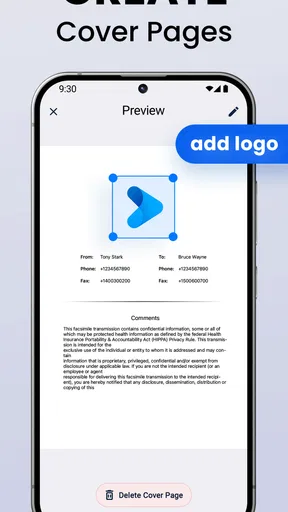
FaxFree provides a user-friendly interface that allows you to send faxes directly from your mobile device. Key features include the ability to upload documents from your phone, cloud storage integration, and a scanner function to digitalize physical documents. Additionally, FaxFree supports multiple file formats, making it versatile for various document types.
Is FaxFree secure for sending sensitive documents?
Yes, FaxFree prioritizes security by using advanced encryption protocols to protect your data during transmission. The app ensures that your sensitive documents are securely sent and received, providing peace of mind for users who need to send confidential information. Always check the app's privacy policy for more details on data protection.
How much does it cost to use FaxFree?
FaxFree offers a free trial to new users, allowing you to test its features without any initial cost. After the trial, the app operates on a subscription model, with different pricing tiers based on usage needs. Users can choose a plan that aligns with their frequency of faxing and specific requirements.
Can I receive faxes with FaxFree, or is it only for sending?
FaxFree is primarily designed for sending faxes. However, it also offers the functionality to receive faxes, depending on your subscription plan. This feature allows you to manage incoming faxes directly from your phone, making it a comprehensive solution for all your faxing needs.
What file formats are supported by FaxFree for sending faxes?
FaxFree supports a wide range of file formats, including PDF, DOC, JPG, and PNG. This flexibility ensures that you can send various types of documents without needing to convert them first. The app's compatibility with numerous formats makes it convenient for users who need to fax different document types regularly.


